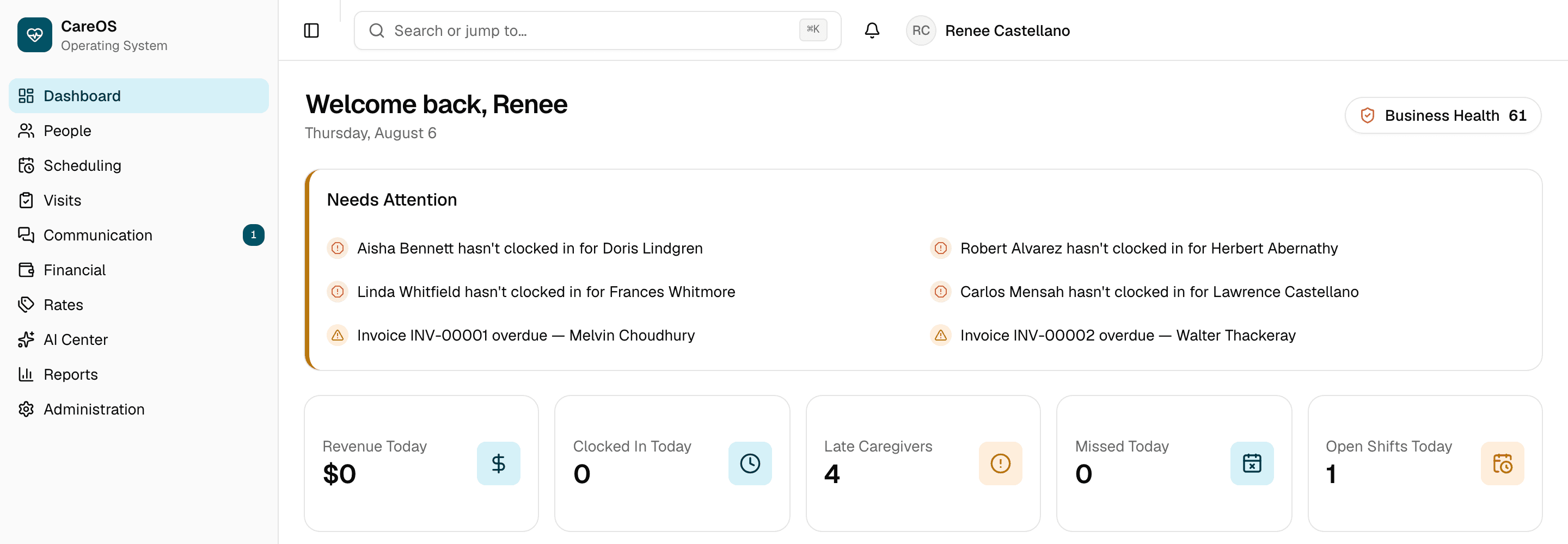
The problem
The work is coordination, and it happens across four systems.
Most agencies do not have a scheduling problem or a billing problem. They have a problem where those two things are held in different places.
A caregiver calls off at seven in the morning. Someone has to find cover, tell the client, update the schedule, and make sure the visit that did not happen is not billed and the visit that replaced it is.
None of that is difficult on its own. It becomes difficult when the schedule lives in one system, the visit record in another, the payroll spreadsheet on someone’s desktop, and the invoice in the accounting package — and each one has to be updated by hand, in the right order, by someone who remembers.
The cost of that is not usually a dramatic failure. It is a slow one: hours paid that were never billed, a visit that cannot be evidenced when a payer asks, a rate change applied to work that was done before it.
This is a coupling problem, not a features problem. Buying a better scheduling tool does not fix it, because the gap is between the tools rather than inside any one of them.
Why CareOS
One system, entered once.
CareOS is not eight tools that integrate. It is one system in which a visit is a single record that scheduling, payroll, billing and reporting all read.
When a caregiver clocks out of a verified visit, that one record is what payroll pays against, what the invoice bills against, what the EVV evidence refers to, and what the margin report counts. There is no export step, no nightly sync, and no second place for it to be wrong.
That is also why the rate history matters. A visit carries the pay and billing rates that applied on the day it happened, so raising a rate next month does not quietly change what last month cost.
Every module below is built and has been tested against a real database, not a demo fixture.
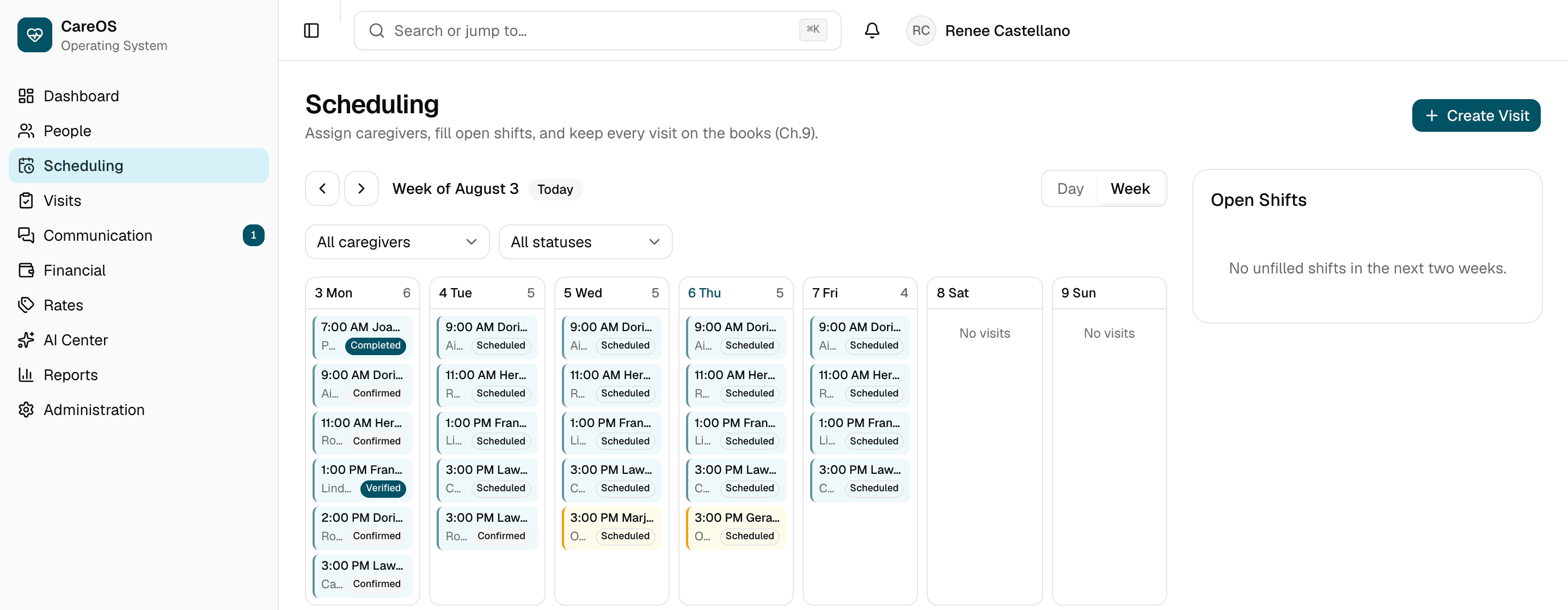
People
Clients, caregivers, contacts and staff in one record, with documents and a history of who changed what.
Scheduling
Calendar-first, with recurring series, open shifts, availability, and conflict detection that refuses a double-booking rather than warning about it later.
Visits & EVV
GPS-verified clock-in and clock-out, a documentation-pending queue, and incident reporting.
Payroll
Draft runs built from verified visits, at the pay rate that applied on the day worked — not today's rate.
Billing
Invoices from those same verified visits, with payments, overdue tracking and a printable invoice.
Reporting
An executive view and per-module reports, with period-over-period comparison and CSV export of anything you can see.
Administration
Users and roles, pay and billing rates, your service catalog, and an audit log you read yourself.
WISDOM
An assistant that answers questions about your operation from a summary with names removed before it leaves CareOS.
How it works
From setting up to getting paid.
The same path every agency takes, in the order it actually happens.
Set up your agency
Your services, your pay and billing rates, your people and their roles. Rates are dated, so changing one later does not rewrite what you already paid.
Manage your people
Clients and caregivers in one place, with availability, documents and status. Archiving someone keeps their history rather than erasing it.
Deliver care
Schedule visits, fill open shifts, and let caregivers clock in and out with location verification. Documentation that is still outstanding sits in a queue rather than being forgotten.
Get paid
Verified visits become a payroll run and an invoice from the same underlying record, so the hours you pay and the hours you bill cannot drift apart.
See what is happening
Margin, utilisation, EVV compliance and overdue invoices, traceable back to the individual visits behind them.
Meet WISDOM
An assistant that answers questions. It does not make decisions.
WISDOM can tell you which visits are missing documentation this week. It does not decide who to send, who to hire, or what to charge — and it is not designed to.
WISDOM works from your own operational data and answers within the permissions of whoever is asking. A coordinator and an owner asking the same question see different answers, because they are entitled to see different things.
It cannot reach another agency’s data. That boundary is the same one the rest of the product uses, not a separate promise made for the AI.
What leaves CareOS, and what does not
The operational summary WISDOM works from has client and caregiver names removed before it is sent to the AI provider. That de-identified version is a separate representation held for the purpose, not a filter applied on the way out — and it is enforced by a test, not by a convention.
WISDOM is optional. An agency that would rather not use an AI assistant at all can turn it off, and the rest of CareOS works exactly as before.
Security & trust
Security you can check, not just read about.
You would be putting your clients' medical information into software built by people you have not met. That deserves more than a page of assurances.
- Your agency's records are separated from every other agency's by two independent layers — the application and the database, each enforcing it alone.
- Restricting a caregiver to their own clients is enforced as its own rule, not assumed as a side effect of agency separation.
- Changes are written to an audit log you read yourself, including when the change was made by us.
- Support access is time-limited, needs a written reason, and is read-only unless write access is explicitly requested.
We also publish what is missing
No signed business associate agreement yet, so we do not describe ourselves as HIPAA compliant. No independent security audit. No multi-factor authentication. The security page lists each of these plainly rather than leaving you to find out.
See it for yourself
Thirty minutes, your scenarios.
We ask how your agency actually runs before showing you anything, then walk through the working product against the situations you described.
- A 30-minute call with someone who built the product.
- You will see the real product, not slides.
- If CareOS is not right for you, we will tell you.
- No follow-up sequence unless you ask for one.
Seven questions to request one — name, work email, agency name, roughly how many caregivers you have, your role, what is most frustrating about your current setup, and when suits you.
That last question is the one that matters. It is what turns a general tour into a session about your actual operation.
Questions
The five we are asked most
More detail lives on the security and demo pages.
What size agency is CareOS for?
Agencies running roughly 15 to 150 caregivers. Much smaller and it is likely more than you need today; much larger and there may be scale limits we have not yet proven. We would rather say that on a call than after you have committed.
Is CareOS HIPAA compliant?
No — and we would be careful with any vendor who answers that with a simple yes. CareOS is built around HIPAA’s technical safeguards, but compliance also requires contractual agreements with the providers who host the data, and ours are not yet complete. The security page sets out exactly where that stands.
Do we have to use the AI features?
No. WISDOM is optional and can be turned off, and everything else in CareOS works the same way without it. Where it is used, client and caregiver names are removed before anything reaches the AI provider.
Who owns our data?
You do. CareOS supports exporting your records as CSV from every module, and your audit log is readable inside the product without asking us for it.
How established is CareOS?
We are early. The product has been through engineering certification module by module, but it has not yet run a live agency in production, and we are choosing our first customers deliberately rather than growing as fast as possible. If being among the first is not the right risk for you right now, that is a reasonable conclusion.
What support do we get, and who do we call when something breaks?
Support is the person who built CareOS. There is no call centre, no tier-one script, and no ticket that gets closed by someone who has never seen the code. For an agency of your size that is usually better than the alternative — but you should know exactly what it is and is not.
What it is not: there is no 24/7 line, no phone support, no guaranteed response time and no service level agreement. CareOS also has no automated uptime monitoring yet, which means an outage is currently noticed by a person rather than by an alert. That is a real gap and it is being closed before we take on more agencies than one founder can watch.
What is true regardless: your records are exportable as CSV from every module at any time, and your audit log is readable inside the product without asking us. If support ever stopped, you would still be able to get your data out yourself, that day, without our cooperation.
Until a published support address exists, the demo request form is the route to a human. It is stored the moment you submit it and returns a reference you can quote.
Before you go further
What CareOS does not do.
Every vendor has a list like this. Most will let you find it after signing.
It does not submit to state EVV aggregators.
CareOS records GPS-verified clock-in and clock-out and keeps it as evidence. It does not transmit to Sandata, HHAeXchange, Netsmart or Tellus. If you bill Medicaid, that is a compliance requirement we do not meet, and we are the wrong system for you today.
It does not integrate with your accounting or payroll provider.
There are no live integrations. Data moves in and out by CSV. This is the request we hear most, and it is the top of the roadmap — but a logo on a page for something that does not work is how this industry lost its customers' trust.
It does not support multiple offices.
CareOS treats your agency as a single organisation. No branch structure, no per-office permissions, no roll-up reporting across locations.
It does not offer single sign-on or two-factor authentication.
Neither is built. If your security policy requires them, we cannot meet it yet.
It has no public API.
Nothing to build against today.
It has no 24/7 support line and no uptime monitoring.
Support is one person — the engineer who built it — reachable through the demo form until a published support address exists. There is no phone line, no guaranteed response time and no SLA. Nothing yet watches the system automatically, so an outage is noticed by a person. You can export every module to CSV at any time, which means getting your data back never depends on us answering.
It has no customers yet.
You would be among the first. That is a genuine risk to you rather than a charming detail, and it is the one thing on this list we cannot fix by building something. We would rather you weighed it with the facts than have us talk around it.
If any of those is a dealbreaker, we would genuinely rather you knew now. If none of them is, the demo page sets out exactly who CareOS fits.
Bring the scenario that breaks your current software.
The overnight shift that straddles two days, the caregiver covering three clients in an afternoon, the payer who needs the visit evidenced. Thirty minutes, and we will tell you plainly whether CareOS fits.